
Through Automation Rules you can add a task to your contacts if an event of any kind has occurred. Such option may turn out to be useful for salespeople, who apart from being notified about the contacts’ activity by an alert, may want to plan the task after the occurrence of the event. The action was designed with the thought of supporting the organization of work with customers.
You can find more information about tasks here
Go to Automation Processes => Automation Rules => Add new rule
From the list of the elements, choose Action: Add task for the user.
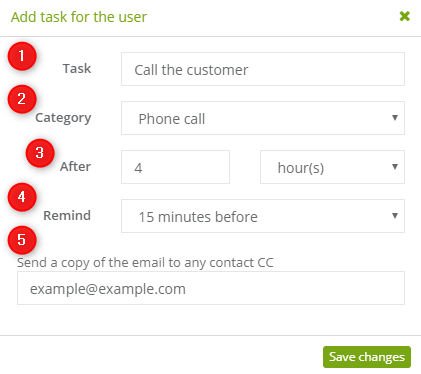
Then go to the settings of the action:
[1] Task – type in the title of the task.
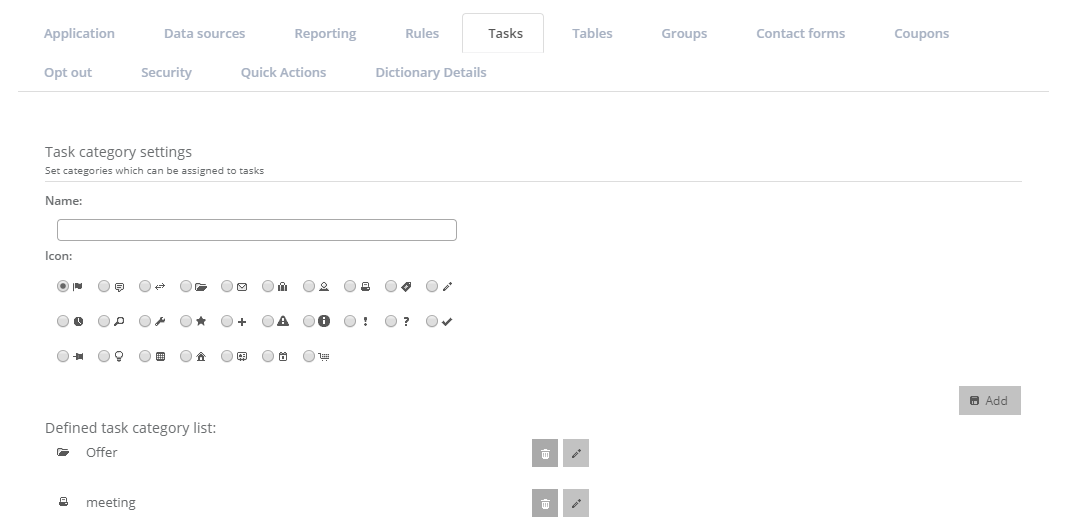
[2] Category – choose a pre-set category of task. You can create a task category in Settings => Other => Tasks
[3] After – determine when the task should be accomplished.
[4] Remind – choose when you should get a reminder on a mailbox.
[5] CC – add an optional email address, if the rule is set to use a different account.
IMPORTANT: the action assigns task to the main owner by a default.


