
You can send an SMS if you have the contact’s phone number and the SMS gateway configured.
In the following example, if the contact signs up for the newsletter with the discount code and will go into the system with the appropriate tag, they will receive a discount code via SMS. You can also specify the time, the SMS text and the name of the sender. Up to 160 characters can be entered in the message. You can also use the dynamic attributes.
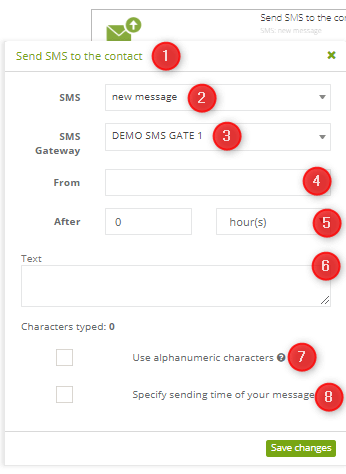
To set this action:
[1] The type of action: send an SMS to the contact.
[2] SMS: choose a pre-prepared template messages or create a new message.
[3] SMS gateway: the system indicates which SMS gateway was integrated.
[4] After: determine when the message will be sent.
[5] From: you can optionally specify the name of the sender.
[6] Text: type a new text message (optionally).
[7] Use alphanumeric characters: after choosing this option, all the special characters (e.g. ą,ę,ó,ä,¿, ë,¡) used in the message, will be changed.
[8] Specify sending time of your message: allows you to specify the time of sending your message by choosing the range of time, when do you want your message to be sent (hours from/to).
IMPORTANT: If for some reason the rule runs outside the chosen period of time, the messages won’t be sent that day but the next within the previously specified period.


