
Segmentation is an important element in Marketing Automation. AdHoc Rules allow you to perform a one-time segmentation of Contacts based on the history of their visits to your website (and its particular URLs).
To perform archival Contact segmentation, go to:
Audiences → Segmentation → AdHoc Rules
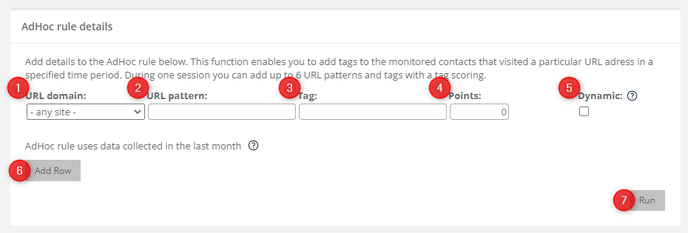
In order to perform the segmentation, define the following settings:
[1] URL domain – select the domain for which the segmentation is to be performed.
[2] URL pattern – provide the URL to be searched for archival visits of monitored Contacts.
[3] Tag – enter the tag to be assigned to Contacts who have visited the specified URL.
[4] Points – here you can define the scoring for the tag provided in field [3]. Enter the number of points to be assigned for a visit to the specified URL(s).
[5] Dynamic – just as in the case of dynamic matrices, by checking this option, you can define a URL address by means of a regular expression and thus create tags.
Learn more about URL patterns >>
[6] Add Row – click this button to add another row to the AdHoc rule:
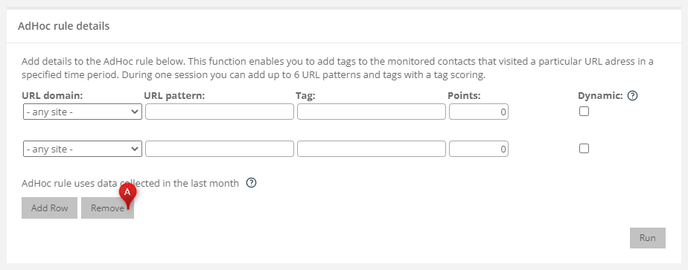
One rule can contain up to 6 rows (6 URLs). This way you can assign tags for several different URLs by running a single rule.
If you want to delete an added row, click Remove [A].
Having defined all settings for all rows, click Run [7].


