
The condition is met when a Contact enters your website from the source specified in the condition (this can be an external domain, your own domain or a specific URL address on your domain).
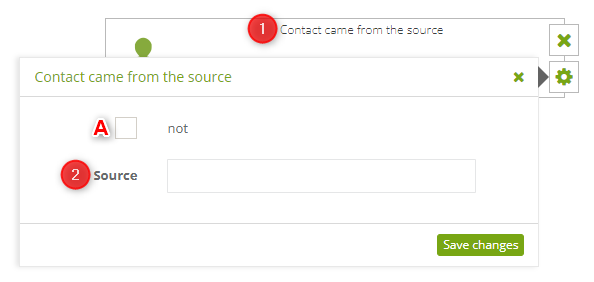
The following settings must be defined:
[1] Condition type – Contact came from the source.
[2] Source – specify an external domain, or a URL address on your own domain, to which the condition is to apply.
Examples: externaldomain.com; yourdomain.com; yourdomain.com/store/product/turtleneck-sweater.
IMPORTANT: In the case of an external domain, only the domain (or subdomain) must be entered in the “Source” field, e.g.: example.com or store.example.com. If a specific URL path is provided, the condition will not work.
If the condition is to apply to your own domain, you can indicate a full URL address.
IMPORTANT: To create a condition: “Contact did not come from the source”, check [A].
Having defined your settings, click on “Save changes”.


