
Dictionary details are additional information about a contact that cannot be added to the Contact Card by a regular import. They differ from standard details in that they contain data based on a date or number (e.g., user child’s birthday, shoe size). You can find dictionary details on the Contact Card in the Details and tags tab.
Read more about dictionary details >>
This condition is fulfilled if the contact has a dictionary detail.
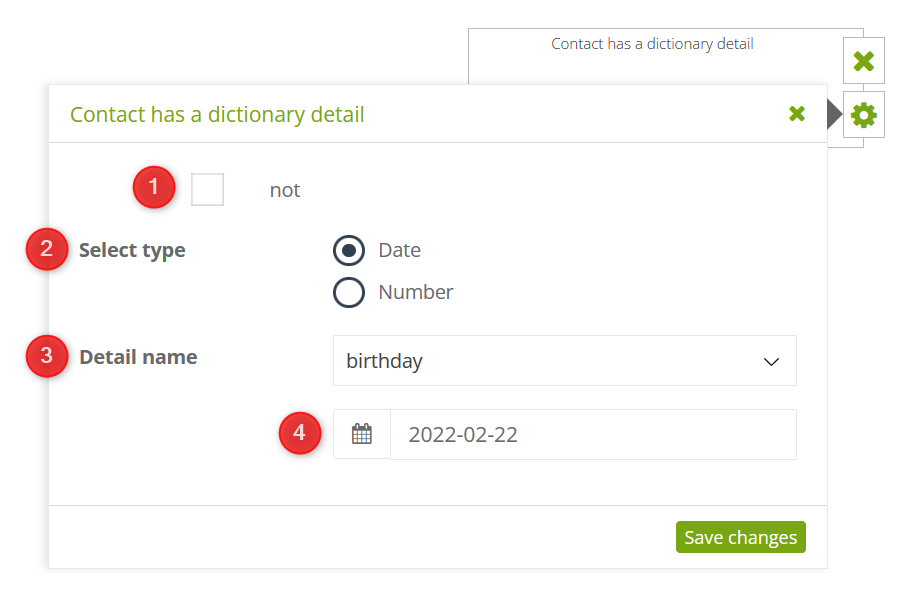
[1] Select “no” if you want to negate the condition, and as a result, it will apply to all contacts that do not have the given dictionary detail.
[2] Select type – define the type of data on which the dictionary detail is based: date or number.
[3] Detail name – select the dictionary detail you are interested in from the list.
[4] Date – if the chosen dictionary detail is based on a date, select the day you want it to relate to.
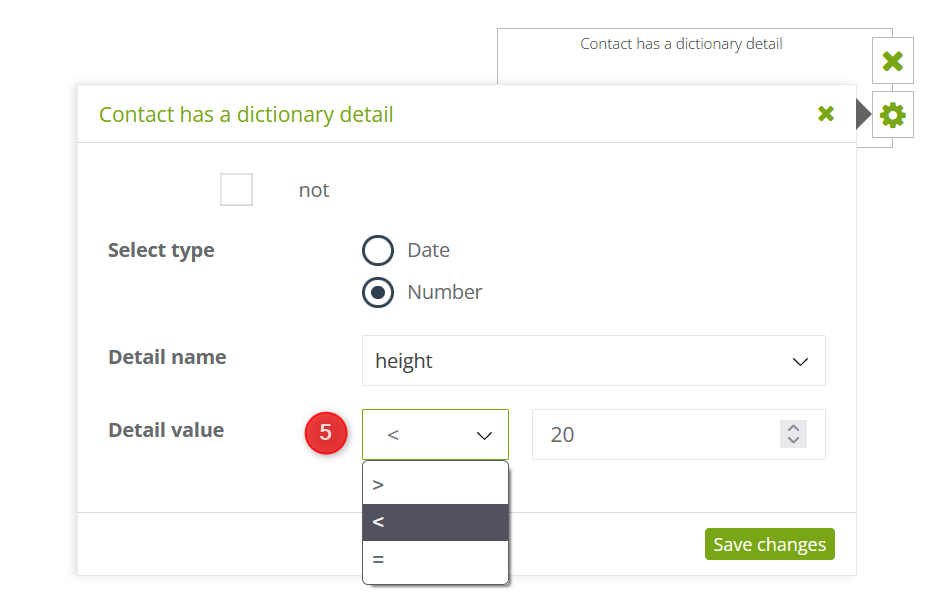
[5] Detail value – if dictionary detail is based on a number, enter its value and select the appropriate mathematical operator:
- “>”, If the detail value is greater than the indicated number,
- “<”, If the detail value is smaller than the indicated number,
- “=”, if the detail value is equal to the indicated number.
After making the settings, save changes.


