
The condition is met when the score of a particular tag has reached a specified value.
NOTE: Tag scoring is not the same as normal scoring. If you add scoring to a tag, you are able to add a number of tag points that will be added to the general scoring of a contact if such tag will be assigned. For example, if you use automation rule to set a scoring of 10 to a tag NEWSLETTER, every contact who will be assigned with tag NEWSLETTER will automatically gain 10 points of scoring.
Go to Automation Processes => Automation Rules => Add New Rule
From the list of elements choose Conditions => Tag scoring is greater than or equal
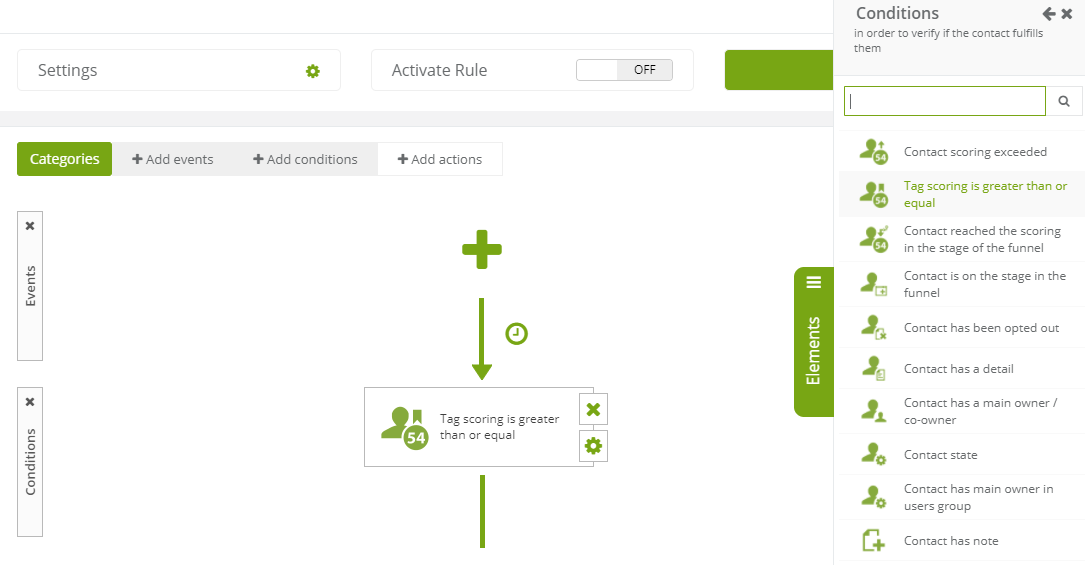
Then go to the settings of the condition:
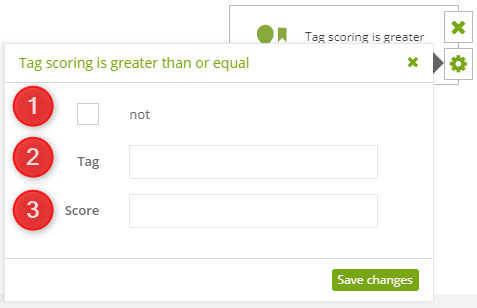
The condition must include:
[1] No – select to invert the condition, so the condition will be met if the contact doesn’t exceed the scoring.
[2] Tag – select a tag.
[3] Score – set the value to trigger the rule when reached.
TIP: The condition will be met if the scoring exceeds the set scoring, e.g. 10 points (if the scoring is equal or greater than 10).


