
Dynamic segments allow you to define the appropriate group users based on their actions in the application and information about their other applications on the phone.
To create dynamic segment, enter the Automation -> Dynamic segments and click “Create dynamic segment” button
Fill in the Name field that will help us identify the segment in the system.
In the Conditions we set the rules that determine whether users will be in a particular dynamic segment.
Conditions can be combined with the conjunction “and” and “or”.
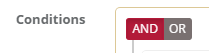
In the case of the conjunction “and” all specified conditions must be satisfied that the user was in the dynamic segment. In the case of the conjunction “or” enough that one of the conditions is satisfied that the user was in the dynamic segment.
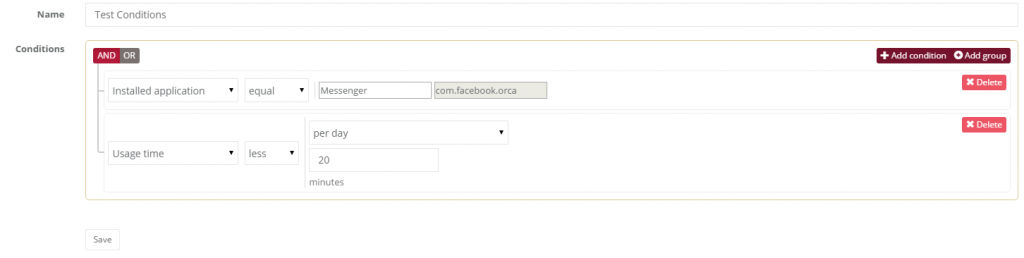
In this example, users will find themselves in a dynamic segment, if you have applications Messenger and spend less than 20 minutes a day in our application.
Additionally, we have the ability to create groups of conditions. They are to be dealt with in the same way as a single rule.
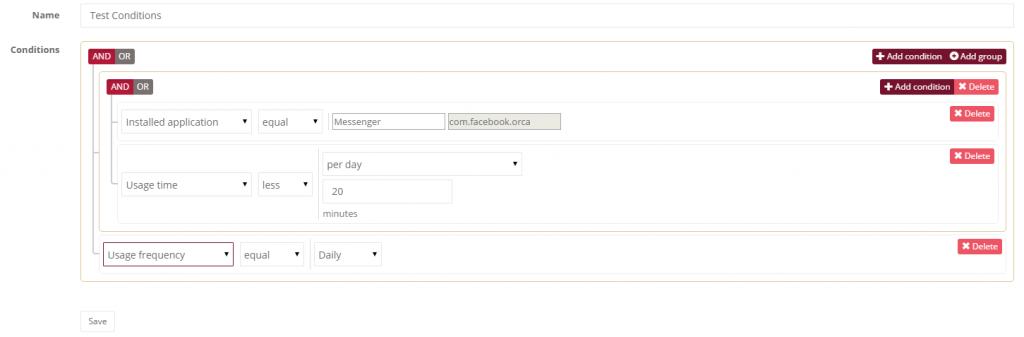
In this case, the dynamic segment also there will be people who have applications Messenger and spend less than 20 minutes a day in our application – defines the first group of conditions. Additionally, in this segment there will be people who use our applications every day.


