
This event triggers a rule if the contact clicks a specific URL in the email that was sent to them.
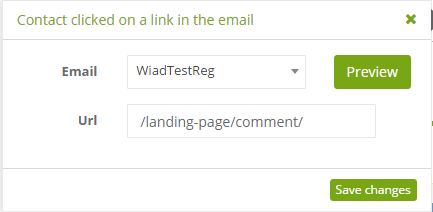
To set this rule:
[1] The type of event: contact clicked on a link in the email.
[2] Email: select the email to be monitored in order to detect clicks. Select emails available on the list of standard emails.
[3] URL: select which URL should trigger the rule when clicked. This way you can limit the rule to be triggered only by clicking a specific link in the email. Remember to remove the server address from the URL when you enter it into the URL field (see: screenshot above). If you leave this field empty, the rule will be triggered by clicking any link, except the opt-in and opt-out links.
Any link – if the redirection option is enabled, each click on any link will be counted. If this option is not enabled, the rule will only run for links redirecting to a tracked website.
Redirection option – relates to redirection in mailings to record clicks on links to external sites (only for advanced users). This option can be enabled by going to the menu SETTINGS -> Other -> Application – Use redirection.


