
How to add monitoring code to Joomla!

To add a monitoring code to Joomla! one has to have a login and a password to the website. As soon as you log into go to the Extensions -> Modules tab.

ff

Then click a green button New.


mpdj


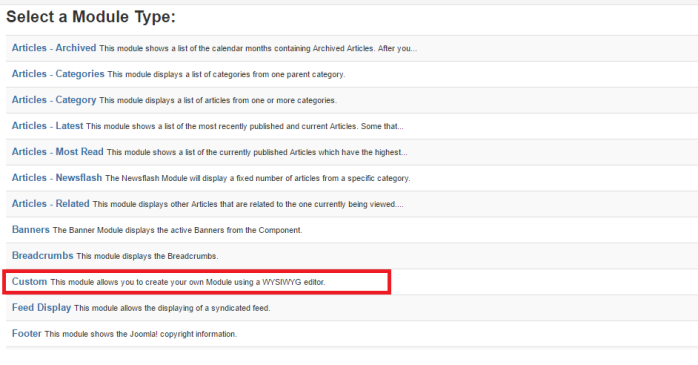
From the list that will show up below choose Custom.
awe


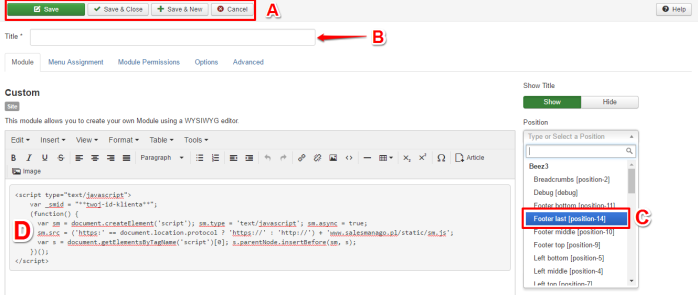
By click “new” button you will be redirected to the HTML creator. Paste the monitoring code from SALESmanago (the code can be found in the system in Settings -> Integration).
erer

[A] To save the structure choose one of the available options.

[B] Provide the title.

[C] Here, please choose the position – footer last (position -14).

[D] Paste the monitoring code from SALESmanago system.

 

If you need more information about the topic mentioned above, please contact us: [email protected] +48 533 600 808

All together. Better.

Leadoo AI, Manago AI and Thulium AI are one seamlessly integrated family.

The #1 conversion platform for turning website visitors into active leads with its conversational marketing tools.

Learn More

Engage, convert and retain your customers with Europe's only AI Customer Data and Engagement Platform built for eCommerce.

Get a demo

Thulium is an omnichannel contact centre system for eCommerce & B2B support that unifies all your customer support.

Learn More


