
In the RFM Marketing Automation dashboard you can perform various actions on contact segments, such as running automation rules, managing contacts and assigning tags.
There is also a possibility of adding a custom audience to a selected contact segment. Keep in mind that every contact included in the generated segment will be automatically moved to a Custom Audience contact group. Deleting a contact from the segment also deletes that contact from the Custom Audience.
In order to perform this action go to:
START → AUTOMATION PROCESSES → RFM MARKETING AUTOMATION: RFM ANALYTICS
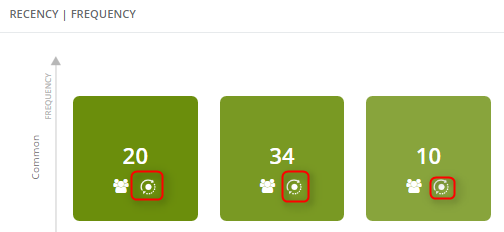
On a segment you want to work on, click the second button (see: screenshot). The Execute action window will open. From a drop-down list choose Add Custom Audience. Then fill in the fields.
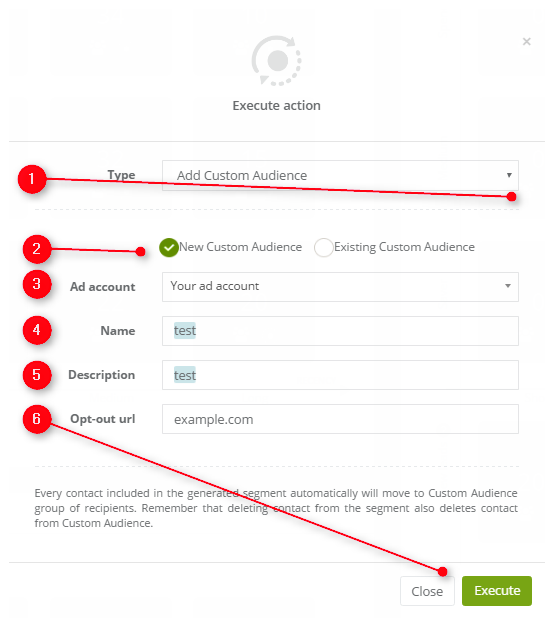
[1] Type – you can change the performed action to another one from the list (all unsaved data will be lost)
[2] New Custom Audience/Existing Custom Audience – choose whether you want to use a new custom audience or an existing one for the purpose of this action
[3] Ad account – chose your ad account
[4] Name – provide the name for this custom audience
[5] Description – provide a description for this custom audience
[6] Opt-out URL – choose an opt-out URL
To go back and discard all changes press Close. To save and execute the action press Execute.


