
Users of the SALESmanago System have the advantage of using a module to keep track of fake/nonexistent email addresses.
Automatic alerts about “Hard Bounces”
Hard bounces occur when an email returns to you stating that the address is nonexistent or the email server considers it as SPAM. Unlike soft bounces, hard bounces indicate a permanent error. However, SALESmanago does not immediately disqualify a Contact after a single occurrence. A Contact is marked as Invalid only if they register more than one hard bounce (specifically indicating that the email address does not exist). Once this threshold is reached, SALESmanago considers the email address a lost cause and prevents further emails from being sent to this address.
Bounces can be hard or soft. With soft bounces the reason for delivery failure is only temporary – e.g. full mailbox, server connection timeout (temporary server problem that has occurred at the moment of message delivery), attachment size exceeding the allowable limit and a few others. Soft bounces do not communicate with incorrect or non-existing email addresses – they signal only temporary delivery problems.
SALESmanago Marketing Automation checks Inbound Emails at all times and is able to mark the address as Undeliverable. At this point an email will not be removed automatically, however, no new emails will be send. To remove the email permanently you can simply go to Menu → Audiences → Contacts → Contact management → Contact List and adjust accordingly. Go to the FILTER. Most of a time there is a simple misspelling of the email address. A letter or a number out of place will result in this type of bounce.
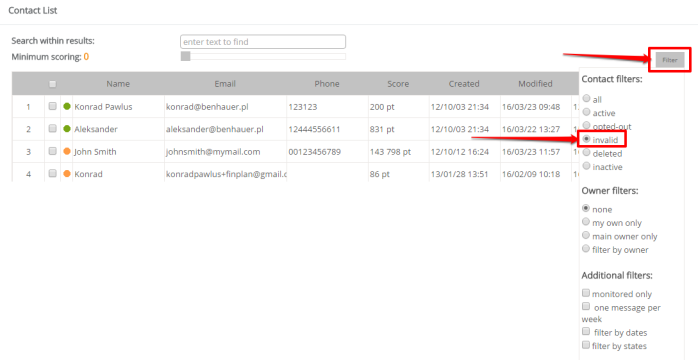
Here you can choose the option depending on the email’s return condition. This is where SALESmanago can accurately categorize the returning email.
To ensure correct marking of hard bounces you should:
- configure incoming mail and click ‘Remove bounces from server’ if you use your own delivered server. When using servers provided by SALESmanago hard bounces will be marked without any additional configurations;
- leave the bounces on your own incoming mail server so that SALESmanago can read and mark them. Remember: the bounces stored on the server must be unread. Importing messages e.g. to your email client or removing them from the server as well as reading the messages directly from the server will prevent the correct functioning of the mechanism.


