
This Action allows you to automatically send an email alert when a Contact reaches this stage of your Workflow.
The email alert can be sent to the Contact’s main owner and/or to any specified email address.
After adding this Action to your Workflow, define the following settings:
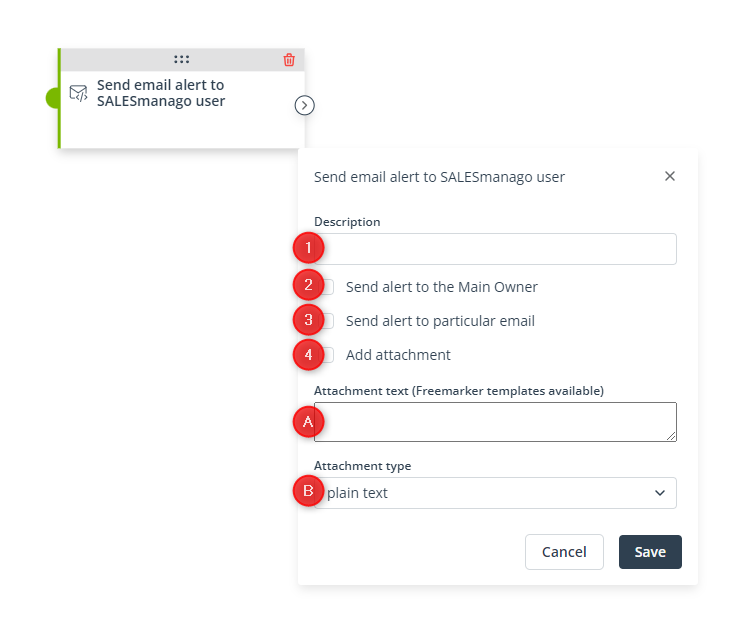
[1] Description—Enter a short alert description that will appear in the contents of the alert.
[2] Send alert to the Main Owner—Check this box if you want to send the alert to the respective main owners of Contacts that have reached this stage of the Workflow.
[3] Send alert to particular email—Check this box if you want to send the alert to a specific email address. Enter the address in the input field that will appear.
[4] Add attachment—Check this box to include an attachment in the email alert. Enter the text of the attachment in field [A] and select the attachment format in field [B].
[A] Attachment text (Freemarker templates available)—Enter the text of the attachment, which can be, e.g., a Freemaker template.
[B] Attachment type—Select the format in which the text entered in field [A] will be attached to the email. You can choose from: plain text, XML, CSV, text/HTML.
Read more about setting alerts here >>
Click Save to continue configuring your Workflow.


