
You can use this Workflow element if you have the feature: Customer Preference Center >>.
This Condition is met if a Contact has specified their preferences for Channels & Frequency via the Customer Preference Center.
Channels & Frequency provide information on the manner of communication preferred by your Contacts: their favorite marketing channels and preferred messaging time (day of the week, time range) and frequency (regularly, sometimes, occasionally). The Condition: Contact has specific preferences for Channels & Frequency allows you to adjust your communication with customers based on preferences indicated via the Customer Preference Center.
Learn more about Channels & Frequency >>
After adding this Condition to your Workflow, define the following settings:
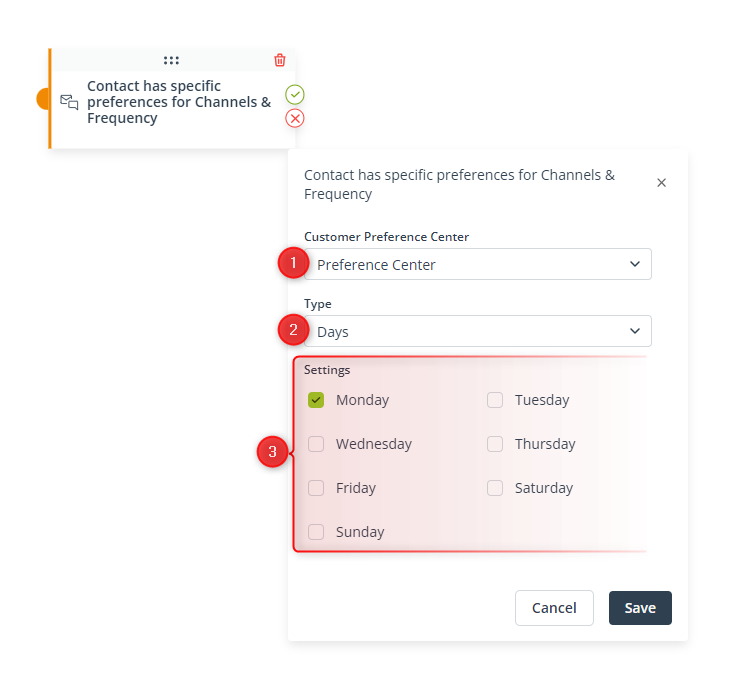
[1] Customer Preference Center—Use the drop-down list to select the Preference Center for which the Condition will be checked. The list contains all your active Preference Centers.
[2] Type—Select the type of preference that you want to check in this Condition.
NOTE: A single Condition can contain settings for only one data type. If you want to set Conditions relating to more than one data type, drag further Conditions: Contact has specific preferences for Channels & Frequency onto the board and connect them with arrows (as shown on the screen below).
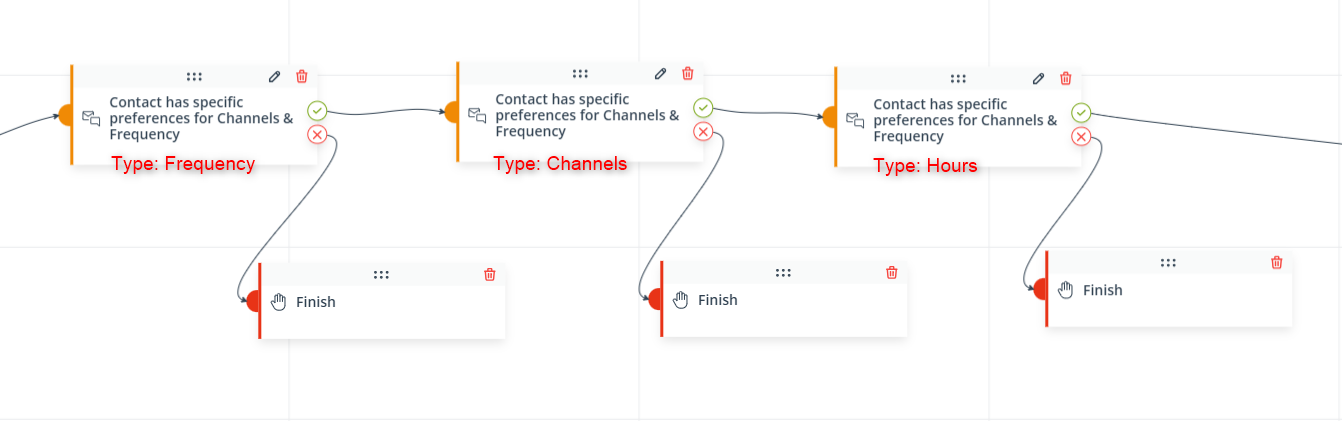
Such Conditions: Contact has specific preferences for Channels & Frequency will be connected by the AND operator, meaning that for a Contact to go further down this path, all the conditions specified in all the tiles must be met. (See also Important below.)
[3] Settings—Depending on the data type selected in point [2], you will see different settings. Select the option(s) for which you want the Condition to be met. You can choose from among:
- Days:
- Monday
- Tuesday
- Wednesday
- Thursday
- Friday
- Saturday
- Sunday
- Frequency:
- Regularly
- Sometimes
- Occasionally
- Channels:
- SMS
- Web Push
- Hours:
- from-to, 24-hour clock
IMPORTANT: The options are connected by the AND operator, which means that for the Condition to be met, a Contact must indicate as preferred all the options selected in the Condition’s settings (see the examples below).
EXAMPLE 1:
The options checked in the Condition’s settings are: Monday, Tuesday, Saturday, Sunday.
A Contact indicates the following days in the Preference Center: Saturday, Sunday.
This Contact does not meet the Condition.
EXAMPLE 2:
The option checked in the Condition’s settings is: Sunday.
A Contact indicates the following days in the Preference Center: Saturday, Sunday.
This Contact does meet the Condition.
Click Save to continue configuring your Workflow.


